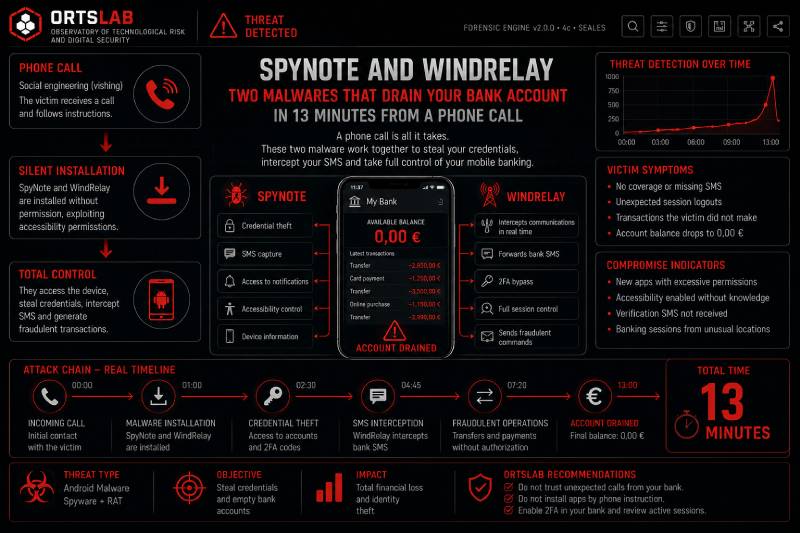
The phone rings. Someone claims to be from your bank and warns you of a problem with your card. They ask you to install an app to verify your identity — the app comes personalised with your name, making it look legitimate. Thirteen minutes later, the attacker has taken out a loan in your name and used your credit card at a physical payment terminal miles away, while you had your phone in your hand.
This is not a hypothetical scenario. It is the case documented by Group-IB in August 2026, describing the combination of two Android malware tools — SpyNote and WindRelay — operating in tandem to execute complete bank fraud from a single phone call.
🔍 Suspicious message?
Analyze senders, links or files in real time with our scanner.
Two malware tools, one objective
SpyNote is an Android remote access trojan (RAT) active since 2021, whose popularity among attackers surged in 2023 after its source code was leaked. Once installed on the victim's device with Accessibility Service permissions granted, it gives the attacker full control over the phone: they can see the screen in real time, launch applications, intercept SMS messages, activate the microphone and camera, and capture keystrokes.
WindRelay is more recent and more specific: it turns the phone into a fraudulent NFC reader. When the victim taps a payment card against the phone and enters their PIN, WindRelay captures the transaction authentication data and relays it in real time to the attacker's device. The attacker uses that data at a real payment terminal, as if they had the physical card in their hand.
The combination is more dangerous than either malware individually. SpyNote provides remote access to install WindRelay without further victim interaction and to operate the banking apps on the device. WindRelay provides the direct cash-out channel via NFC. Together, they cover both access to the bank account and extraction of funds.
How the attack works step by step
The attacker calls the victim posing as a bank employee and claims there is a problem with their payment card. To add credibility, they have generated a version of SpyNote with the victim's name in the app label — attackers use an automated builder that creates personalised APKs per target.
During the call, they convince the victim to install the application outside Google Play — sideloading — and to grant it Accessibility Service permissions. With that, the attacker has full remote access to the device. They install WindRelay without further victim interaction, access the installed banking apps, and take out a loan in the victim's name.
They then instruct the victim to tap their credit card against the phone and enter their PIN. WindRelay captures the NFC exchange including the transaction-specific authentication data and relays it to the attacker's device. Transactions are approved using the PIN the victim just entered.
Total time from the first call to completed fraud: 13 minutes.
Why NFC relay attacks are particularly hard to detect
NFC relay attacks do not require cloning the card or obtaining the static chip data. They relay the communication session in real time between the real card and the attacker's terminal. From the payment terminal's perspective, the transaction looks entirely legitimate — the authentication data is valid because it corresponds to a real session with the victim's actual card.
Android NFC relay malware is not new — families such as NGate, SuperCard X and NFCShare have been active for several years — but combining it with a RAT like SpyNote that provides full remote device access adds a layer of sophistication: the attacker doesn't need to trick the victim into doing anything beyond installing the first app. Everything else they do themselves from another device.
If you receive a call like this
Don't do this:
- Don't install any application requested by the caller, even if it appears to come with your name on it or seems to be from your bank.
- Don't grant Accessibility Service permissions to any app installed outside Google Play.
- Don't tap your card against your phone because someone on a call tells you to.
- Don't enter your PIN during an inbound call you didn't initiate.
Do this:
- Hang up. Call your bank yourself using the number on the back of your card or the one you already had saved — not any number provided by the caller.
- If you have already installed an app during the call, disable WiFi and mobile data immediately and contact your bank.
- If you tapped your card against your phone during the call, contact your bank immediately to block the card and review recent transactions.
A legitimate app from your bank is not installed on the instruction of an inbound call. A bank's real support channel never requires you to install anything outside their official app or to tap your card against your phone during a phone conversation.