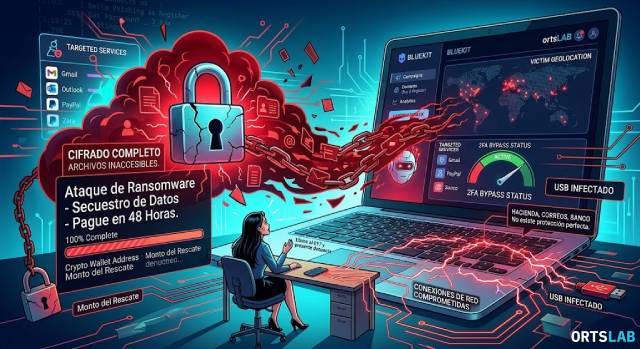
Imagine turning on your computer in the morning and, instead of your desktop, finding a black screen. A message tells you that all your files have been encrypted. Your photos, your documents, your invoices. Everything is locked. At the bottom of the message, an account number and a deadline: if you don't pay within 48 hours, you lose everything forever.
That is a ransomware attack. And it is not something that only happens to large corporations.
What is Ransomware?
🔍 Suspicious message?
Analyze senders, links or files in real time with our scanner.
The word comes from "ransom" and "software." It is a malicious program that enters your computer, encrypts all your files with a key known only to the attacker, and demands money—usually in cryptocurrency—to return your access. If you don't pay, the files remain inaccessible. If you do pay, there is no guarantee you will get anything back.
Spain is one of the most affected countries in Europe. In 2025, 164 documented attacks were recorded, representing a 7.6% growth compared to the previous year. And those are only the cases that are actually reported.
How Ransomware Reaches Your Computer
The most common route is via email. A message that appears to come from the Post Office, your bank, or the Tax Agency, containing an attachment or a link. You open it, and at that moment, the malicious program installs itself without you noticing a thing. The encryption begins in the background while you go about your day. By the time the black screen appears, it is already too late.
Other common entry points include compromised websites—especially content download sites—unknown USB devices, and programs downloaded from unofficial sources. In every case, the mechanism is the same: tricking you into executing something you shouldn't.
Exactly What Happens During an Infection
Ransomware operates in three phases. First, it enters the system silently. Then, it scours all your drives—including connected external disks and shared network folders—and encrypts every file one by one. Finally, it displays the ransom note and waits.
The encryption used is the same type that protects banking communications. Mathematically, it is unsolvable without the key. This is why backups are the only real defense: if you have a copy of your files on a disconnected drive, the ransomware cannot reach it.
To Pay or Not to Pay?
The response from all security organizations—INCIBE, Europol, the FBI—is the same: do not pay. For several reasons. First, payment does not guarantee your files will be returned. Second, if you pay, you prove you are a profitable target, and it is likely you will be attacked again. Third, the money finances criminal organizations that will continue to attack others.
If you have been infected, the first step is to disconnect the computer from the network and any external drives to prevent the ransomware from spreading. Then, call 017, INCIBE's free cybersecurity helpline, and file a report with the National Police or Civil Guard.
If the Attack Has Already Happened: The First Hours Are Critical
When the ransom screen appears, the damage is done. But what you do in the following hours determines whether you will be able to recover anything, identify the attacker and, in the case of a business, meet the legal obligations imposed by the GDPR in the event of a data breach.
The most common mistake is to immediately shut down the computer or reinstall the operating system. It is understandable — the instinctive reaction is to eliminate the problem — but that action destroys the digital evidence that would allow you to reconstruct how the attacker got in, what files were exfiltrated, and from which vector the attack originated.
The right course of action is exactly the opposite: isolate without shutting down. Disconnect the device from the network — both wired and wireless — and from any external devices, but keep it powered on. This preserves the RAM, where traces of the malicious process may remain that will not be found on the disk.
What a Forensic Expert Does After a Ransomware Attack
A forensic IT expert intervenes to document the state of the system at the time of the attack, preserve evidence with legal validity, and reconstruct the chain of events. This is not the same as a technician who comes to clean the machine — the expert's goal is not to repair, but to document.
In practice, this means obtaining a forensic image of the disk before any intervention, analyzing system logs to identify the entry vector, and determining which files were encrypted and whether there was data exfiltration prior to the encryption — something common in modern attacks, where attackers steal data before locking it to use as a second lever of extortion.
The resulting expert report is valid before data protection authorities and before the courts if legal action is pursued. In the EU, this documentation is essential to demonstrate due diligence under the GDPR if the attack has compromised personal data belonging to clients or employees.
When Does It Make Sense to Call a Forensic Expert?
If the attack affects a single personal computer with no sensitive data, it may not be necessary. But if you work with client data, if the affected device is part of a business network, if invoices, contracts, or confidential information have been encrypted, or if your organization has obligations under the GDPR, expert intervention is not optional — it is the way to demonstrate that you acted with due diligence before the authorities.
In those cases, every hour that passes without preserving the evidence is an hour in which data is lost that can never be recovered.
How to Protect Yourself
No perfect protection exists, but these four measures drastically reduce the risk:
Make regular backups. And store them on a drive that is disconnected when not in use. An external drive that is always connected can be encrypted just like the main one.
Do not open unexpected attachments. Even if the sender looks like your bank, the Post Office, or the Tax Agency. If in doubt, analyze the message before opening it.
Keep your operating system and programs updated. Most attacks exploit known vulnerabilities that already have a patch. Updating is the simplest way to close those doors.
Distrust unknown USBs. A flash drive found on the ground or received as a promotional gift can be a trap. Never connect it to your computer without verifying it first.
If You Receive a Suspicious Email Before Opening It
Ransomware requires you to execute something—an attachment, a link, an installer. If you analyze the message before interacting with it, you can spot the warning signs before it's too late: the sender's domain doesn't match who they claim to be, the link points to an unknown server, or the attachment has an extension you didn't expect.
If you've received a message that makes you uneasy and you're not sure if it's legitimate, you can analyze it in ORTSLAB before opening it. The engine detects risk indicators in seconds, without requiring registration or storing the message content.