The email looks legitimate. The logo is correct, the tone is familiar, and the subject line says you need to verify access to your account. In the body of the message, instead of a link, there is a QR code. You scan it with your phone. At that moment you have left your company's protected environment and landed on a phishing page from a device that probably has none of the same security controls.
This is quishing — phishing via QR code — and according to ESET's threat report for the first half of 2026, one in eleven phishing emails detected during that period contained a malicious QR code. It is no longer an experimental technique: it is part of attackers' standard toolkit.
🔍 Suspicious message?
Analyze senders, links or files in real time with our scanner.
Why QR codes bypass traditional security filters
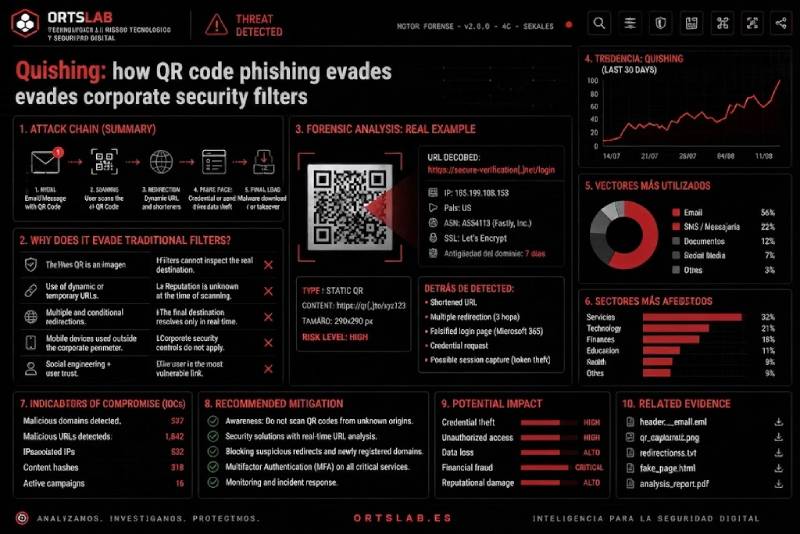
A malicious link in an email is text. Email security systems can extract it, analyse it, compare it against databases of known fraudulent domains and block it before it reaches the user. A QR code is an image. The URL it encodes is hidden inside a visual pattern that most traditional email filters are not designed to decode and analyse.
That difference is the core of the technique. The attacker replaces the malicious link with a QR code encoding exactly the same URL, and in doing so bypasses a significant part of the detection chain. To add another layer of opacity, malicious QR codes are often embedded inside PDF files or JPEG images attached to the email — making automated extraction and analysis of the link even harder.
There is also a device-shift effect that attackers deliberately exploit. When an employee scans a QR code with their personal phone, they leave the corporate security perimeter — the work computer with its controls, policies and security software — and move to a mobile device that may have no equivalent controls. The attacker gets the victim to do the work of bypassing the organisation's security themselves.
How quishing is evolving
Quishing attacks documented in the first half of 2026 go well beyond credential theft through a fake login page. ESET researchers have identified variants designed to:
- Install malicious applications directly from outside official app stores, bypassing Google Play and App Store security controls.
- Redirect the victim to legitimate payment apps with the payee details already filled in, enabling direct financial fraud.
- Inject malicious contacts or events into the phone's calendar or address book, containing phishing links that will activate later.
- Automatically connect the device to a rogue Wi-Fi access point controlled by the attacker.
- Capture multi-factor authentication tokens through adversary-in-the-middle attacks, rendering the second authentication factor useless.
State-sponsored espionage groups have also incorporated quishing into their operations. In January 2026, the FBI warned that the North Korean Kimsuky group used malicious QR codes in spearphishing campaigns targeting think tanks, academic institutions and government bodies, disguising the code as a link to questionnaires or secure document platforms.
Why QR codes generate visual trust
A QR code as a visual object conveys a sense of legitimacy that a suspicious link does not always manage. During the pandemic, QR codes became the standard mechanism for accessing menus, registering for events and making payments — associated with legitimate services in trusted contexts. That familiarity is exactly what attackers exploit.
Combined with the impersonation of recognisable brands — Microsoft, DocuSign, the organisation's own IT department — and the usual urgency mechanism ("your session will expire", "verify your identity within 24 hours"), quishing replicates all the elements of classic phishing with the added advantage that the attack vector is invisible to the human eye: no one can read a URL encoded in a pattern of dots.
If you receive an email with a QR code
Don't do this:
- Don't scan a QR code that appears in an unsolicited email, even if the sender looks legitimate.
- Don't scan a QR code from your work computer with your personal phone without first verifying where the message came from.
- Don't enter credentials or verification codes on any page you reached by scanning a QR code from an email.
Do this:
- If the email appears to come from a service you use, go directly to that service by typing the address into your browser — not through the QR code.
- If you are unsure whether the email is legitimate, upload the PDF or image containing the QR code to ORTSLAB. The engine extracts and analyses the URL encoded in the QR code before you open it.
- If you have already scanned the QR and entered credentials, change your password immediately and check for any unrecognised active sessions on your account.
A QR code in an email is not suspicious by itself — but it is when it appears in an unsolicited message asking you to verify, authenticate or access something urgently. The URL it hides is just as analysable as any text link: you just need to extract it before opening it.