Amazon is the most impersonated brand in phishing campaigns worldwide. It is no coincidence: hundreds of millions of users have an account, place orders regularly and are used to receiving emails about shipments, returns and account verifications. Scammers know this and exploit it.
In this article we analyse how a fake Amazon email works, what signals reveal it is a scam, and how to protect yourself.
🔍 Suspicious message?
Analyze senders, links or files in real time with our scanner.
Why Amazon is scammers' favourite target
Three reasons make Amazon the perfect lure:
- Massive reach — a huge proportion of internet users in any country have an Amazon account. The probability that the recipient is a real customer is extremely high.
- Constant flow of legitimate emails — order confirmations, shipping updates, review requests. Users are conditioned to open Amazon emails without questioning them.
- Believable urgency — a warning about a "suspended account" or "declined payment" triggers an immediate emotional response that overrides critical thinking.
What a fake Amazon email looks like: a real case analysed
This is the profile of the most common fraudulent email in active Amazon impersonation campaigns:
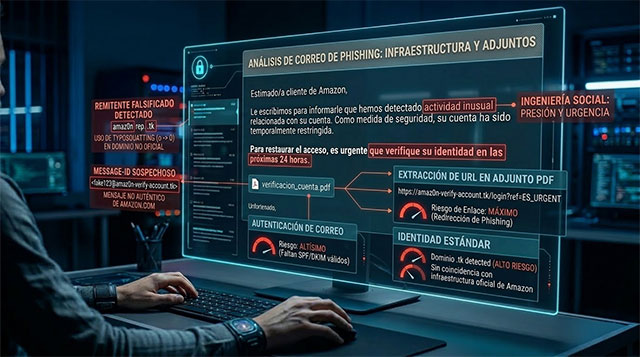
- Sender: support@amaz0n-verify-account.tk
- Subject: Action required: verify your Amazon account
- Attachment: account_verification.pdf
At first glance it looks legitimate. The Amazon logo, corporate colours, a formal tone. But forensic analysis reveals six clear fraud signals.
The 6 signals that expose the fraud
1. The sender domain is not amazon.com
The domain amaz0n-verify-account.tk uses a technique called typosquatting: it replaces the letter "o" with the number "0" so it looks legitimate at a glance. Amazon always sends emails from amazon.co.uk, amazon.com or a regional equivalent. Any variation is fraud.
2. The .tk TLD is a red flag
The .tk extension (Tokelau) is free and can be registered in seconds. It is one of the most used in phishing campaigns precisely because there is no cost barrier. A legitimate Amazon domain will never end in .tk, .xyz, .top or similar.
3. No SPF/DKIM digital signature
Amazon has one of the strictest email authentication configurations in the world. All its emails carry a valid SPF and DKIM signature. If an email claiming to be from Amazon has no valid authentication, the sending server is not authorised — someone is sending in Amazon's name without permission.
4. Artificial urgency language
Phrases like "we have detected unusual activity", "you have 24 hours" or "your account will be suspended" are the central mechanism of the fraud. They do not inform — they pressure. The goal is to make you act before you think. Amazon communicates real problems in an informative tone, not an alarmist one.
5. The malicious link is inside the PDF, not in the email body
This is the most sophisticated detail: the email does not include a visible link in the text. Instead it attaches a PDF that looks like a verification form. Inside the PDF is the real link:
https://amaz0n-verify-account.tk/login?ref=EN_URGENT
This technique prevents the email client's security filters from detecting the malicious URL, because they analyse the message body but do not always scan attachment content.
6. The link domain is the same as the sender domain
Internal consistency of the fraud: everything points to the same fake domain. This confirms it is an infrastructure built specifically for this campaign.
How ORTSLAB detects it
The ORTSLAB engine detects this type of email in under 10 seconds by simultaneously analysing:
- Sender identity — compares the declared domain with the brand it claims to represent and detects typosquatting using typographic distance (Levenshtein algorithm).
- SPF/DKIM authentication — verifies that the digital signature is valid and corresponds to Amazon's real domain.
- PDF attachment content — extracts and analyses URLs embedded inside the document, not just those in the email body.
- Domain reputation — cross-references the domain against VirusTotal and checks its age. A domain registered 3 days ago claiming to be Amazon is guaranteed fraud.
- Pressure language — detects urgency and threat patterns combined with requests for immediate action.
The result is a DANGER verdict with detailed technical evidence, ready to use as the basis for a report to authorities.
What to do if you receive a fake Amazon email
- Do not click any link or open the attachment.
- Go directly to amazon.com by typing the URL in your browser — if there is a real problem with your account, you will see it there.
- Analyse the email in ORTSLAB — paste the text or upload the .eml file to get a full forensic analysis in seconds.
- If you have already entered your details, change your Amazon password immediately and enable two-step verification. If you used the same password on other services, change those too.
- Report the fraud to your national police force or cybersecurity agency. In the UK, report to Action Fraud. In the US, to the FTC at reportfraud.ftc.gov.
The simplest rule to stay safe
Amazon will never ask you to verify your account by clicking a link in an email. If there is a real problem with your account, Amazon will tell you inside the platform when you log in. Any email asking you to act outside of amazon.com is suspicious by definition.
Received an email that might be an Amazon impersonation? Analyse it now in ORTSLAB — the result is instant.